How to transfer money from Unity Bank
Whether you are paying for a service, sending a gift to a loved one, or managing your business expenses, knowing how to move your money quickly and securely is essential. Unity Bank offers a variety of channels to ensure that every customer, regardless of their tech savviness or location, can access their funds.
In this guide, we will explore every available method for transferring money from your Unity Bank account. From the quick convenience of USSD codes to the robust features of the Unifi mobile app, we have covered all the details you need to bank with confidence.
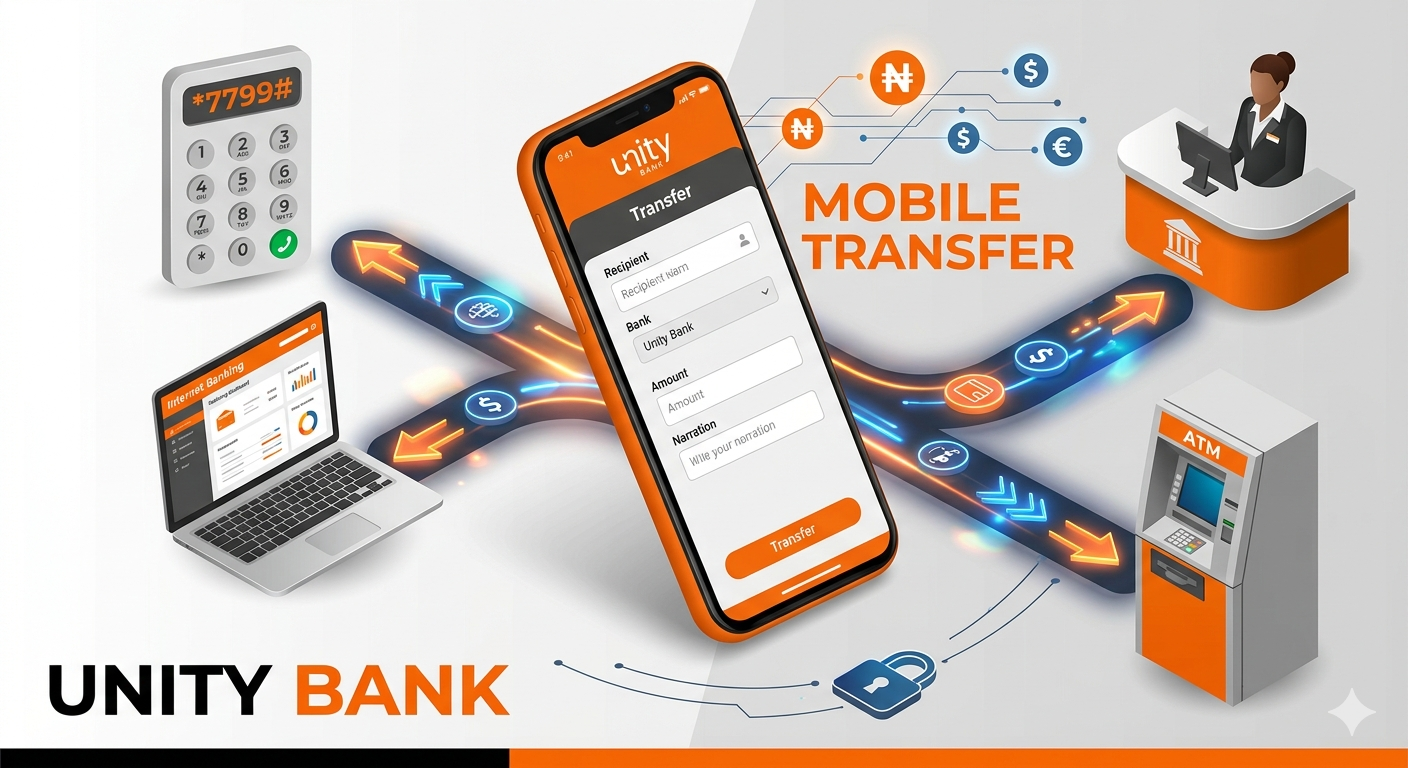
The Unity Bank USSD Code Method (*7799#)
The USSD (Unstructured Supplementary Service Data) method is arguably the most popular way to bank in Nigeria. It does not require an internet connection, making it perfect for quick transactions on the go. Unity Bank’s official shortcode is *7799#.
How to Register for USSD Banking
Before you can send money, you must register your phone number (the one linked to your bank account).
-
Dial *7799# on your mobile phone.
-
Follow the on-screen prompts to register.
-
You will be required to create a 4-digit security PIN. Never share this PIN with anyone.
Transferring to another Unity Bank Account
If the recipient also uses Unity Bank, the process is slightly faster.
-
Dial *7799*1*AccountNumber*Amount#.
-
For example, if you want to send 5,000 Naira to account number 0012345678, dial *7799*1*0012345678*5000#.
-
Confirm the recipient’s name.
-
Enter your 4-digit PIN to authorize the transaction.
Transferring to Other Banks
To send money to a different bank, use the code dedicated to inter-bank transfers.
-
Dial *7799*2*AccountNumber*Amount#.
-
Select the recipient’s bank from the list provided.
-
Verify the account name and details.
-
Enter your PIN to complete the transfer.
Using the Unity Bank Mobile App (Unifi)
For a more visual and feature-rich experience, Unity Bank provides the Unifi app. This application is available for both Android and iOS devices and offers a higher level of security through biometric authentication and transaction receipts.
Setting Up the Unifi App
-
Download the Unifi app from the Google Play Store or Apple App Store.
-
Open the app and click on Sign Up or Register.
-
Provide your account number and the mobile number linked to your BVN.
-
Verify your identity using the OTP (One-Time Password) sent to your phone.
-
Create a secure password and a transaction PIN.
Steps to Send Money on Unifi
-
Log in to the app using your password or fingerprint.
-
On the dashboard, tap the Send Money or Transfer icon.
-
Choose between Unity Bank to Unity Bank or Unity to Other Banks.
-
Input the destination account number and select the bank.
-
Type in the amount and a short description (narration) for the payment.
-
Review the details on the summary page.
-
Enter your transaction PIN to finalize the transfer.
The app allows you to save “Beneficiaries,” which means you won’t have to type in the account numbers of your frequent contacts every time you want to send them money.
Unity Bank Internet Banking
If you prefer using a computer or a laptop, internet banking is your best bet. This is particularly useful for business owners who need to handle larger volumes of transactions or download detailed statements.
Accessing the Portal
-
Visit the official Unity Bank website.
-
Locate the Internet Banking login button.
-
Enter your User ID and Password. If it is your first time, you may need to click Enroll to set up your credentials.
-
Use your hardware or software token to generate a secure code for login.
Making a Transfer Online
-
Once logged in, navigate to the Transfers menu.
-
Select the type of transfer (Own Account, Unity Bank, or Other Banks).
-
Fill in the recipient’s information and the amount.
-
Click Proceed to verify the name of the beneficiary.
-
Authorize the movement of funds using your token code.
Transferring Money via Unity Bank ATM
If you do not have access to a smartphone or a laptop, you can still send money using any Unity Bank ATM or any Interswitch-enabled ATM in Nigeria.
Step-by-Step ATM Transfer
-
Insert your Unity Bank Debit Card into the machine.
-
Enter your 4-digit ATM PIN.
-
Select the Transfer option from the menu.
-
Choose the source account (Savings or Current).
-
Select the destination bank.
-
Enter the recipient’s account number.
-
Enter the amount you wish to send.
-
Review the name of the recipient and the transaction fee.
-
Click Confirm or Proceed to finish.
Keep your printed receipt as proof of the transaction in case of any technical hitches.
Traditional In-Branch Transfers
While digital channels are faster, some situations require a physical visit to the bank. This is often necessary for very large sums of money that exceed your daily digital limits.
How to Transfer at the Branch
-
Walk into any Unity Bank branch.
-
Pick up a Funds Transfer Form.
-
Fill in your name, account number, the recipient’s details, and the amount.
-
Indicate if it is a local transfer or an RTGS (Real-Time Gross Settlement) for high-value transactions.
-
Submit the form to the teller along with a valid ID if requested.
-
The teller will process the transaction and provide you with a stamped copy of the form.
Transfer Limits and Charges
It is important to be aware of the costs and limitations associated with your account. While internal transfers (Unity to Unity) are often cheaper or free, transfers to other banks incur a small fee.
Standard Charges
-
0 to 5,000 Naira: Approximately 10 Naira.
-
5,001 to 50,000 Naira: Approximately 25 Naira.
-
Above 50,000 Naira: Approximately 50 Naira.
Note: These fees are subject to regulatory changes by the Central Bank of Nigeria (CBN).
Daily Limits
Daily limits vary based on the channel. USSD transfers usually have a lower daily limit (e.g., 20,000 to 100,000 Naira) compared to the mobile app or internet banking. To increase your limits, you may need to visit a branch to upgrade your account status or provide additional documentation.
Security Tips for Safe Transfers
Your financial safety is a priority. When transferring money from Unity Bank, always follow these best practices:
-
Protect Your PIN: Never share your USSD PIN, App PIN, or ATM PIN with anyone, including people claiming to be bank staff.
-
Avoid Public Wi-Fi: When using the Unifi app or Internet Banking, avoid public networks that could be intercepted by hackers.
-
Verify Recipients: Always double-check the name that appears after you enter an account number. If the name does not match the person you intended to pay, do not proceed.
-
Ignore Suspicious Links: Unity Bank will never ask for your password or PIN via email or text message.
-
Report Issues Immediately: If you notice an unauthorized transaction, call the Unity Bank customer care line or visit a branch immediately to block your account.
Conclusion
Unity Bank has simplified the way its customers interact with money. Whether you choose the speed of *7799#, the versatility of the Unifi app, or the reliability of a Bank Branch, you have multiple ways to ensure your payments are delivered on time. By following the steps outlined above and staying vigilant about your security, you can enjoy a seamless banking experience every day.